I spent three hours on a rainy Tuesday afternoon—coffee cold, eyes blurring—uploading what I thought were the absolute perfect shots of my storefront. High-resolution, professionally edited, and honestly, they looked like something out of a magazine. I waited for the phone to ring. I checked my rank tracker every single morning, expecting a vertical climb that would make my competitors weep. Instead? Crickets. It was a total gut punch. I had the best-looking photos in the neighborhood, but according to Google, I was practically invisible. It wasn’t until I dug into the technical side of those image files that I realized I was accidentally sabotaging myself. I had been using a fancy editing tool that automatically stripped out all the “unnecessary data” to make the files smaller for the web. Turns out, that data wasn’t junk; it was the EXIF data—the digital breadcrumbs like coordinates and timestamps that tell Google exactly where and when the photo was taken. By being efficient, I was essentially handing Google a blank map and wondering why they couldn’t find my front door.
Give the Algorithm a Map It Can Actually Read
When I first started obsessing over maps analytics, I honestly thought the algorithm was just being picky. I didn’t realize that every single photo you upload is a signal. If you strip the metadata, you’re missing a massive opportunity to prove your proximity to the customer. Today, I’m going to show you how to stop that data bleed so your images actually work for your rankings instead of just looking pretty on a screen. My biggest mistake early on was renaming all my files “Image1.jpg” or “Storefront_Final.jpg.” I completely ignored the specific photo labeling tweak that boosts map impressions because I thought it was too small to matter. It wasn’t. It’s the difference between being a vague suggestion and a verified local authority.
Is messing with file data actually worth your time?
You might be skeptical. After all, it’s just a picture, right? But here is the kicker: Google’s Cloud Vision API is incredibly sophisticated. It doesn’t just look at the pixels; it reads the context. According to industry research from Moz, while the direct ranking weight of EXIF data is a point of debate, the way Google uses image content to verify a business’s geographic relevance is undeniable. When you provide clear, geotagged, and correctly labeled imagery, you are making it easier for the bot to trust your physical location. Have you ever spent hours perfecting your Google Business Profile only to see your competitors—with their blurry, smartphone-taken photos—sitting right at the top of the 3-pack? It’s frustrating, isn’t it? Well, there is a reason for that, and it’s usually because their “amateur” photos have more raw local data than your polished ones. We’re moving beyond just “uploading” and starting to “optimize.” It is time to implement the one photo move that gets more clicks than a five-star rating and actually start seeing some movement on those maps.I remember the first time I sat down with a client who owned a local bakery. They had incredible photos of sourdough loaves, but their Google Business Profile was ghosting everyone. We ran a report through their local seo software and saw that while they existed on paper, their proximity ranking was nonexistent. We realized their “professional” photographer had scrubbed every ounce of location data from the files to “clean up” the metadata. It was like sending a letter with no return address and expecting the post office to know which neighborhood you belonged to.
Turn Your Smartphone into a Location Signal Machine
The easiest way to stop the data bleed isn’t through expensive gear; it’s by using the tools already in your pocket. Most modern smartphones automatically embed GPS coordinates into the EXIF data. The mistake most people make is “exporting” or “sharing” these photos through apps like WhatsApp or Slack, which compress the file and strip that data away. Instead, you need to pull the raw files directly. Think of your citation monitor as the gatekeeper for your NAP consistency; your photos are the visual confirmation of that data. When you upload a raw, geotagged photo, you’re providing a “proof of life” for your business. I once spent a whole weekend re-taking photos of a plumbing supply warehouse because we realized the initial batch was “too clean.” I didn’t just take pictures of the sign; I took pictures of the trucks in the loading bay with the local street signs visible in the background. Within ten days, their rank tracker showed a 40% expansion in their local grid. It wasn’t magic; it was just giving Google the coordinates it was starving for. 
Label your files like a map, not a gallery
Stop naming your files after what you see and start naming them after where you are. Instead of “Front-Door.png,” try “Best-Plumber-Downtown-Austin-Main-St.jpg.” This is the specific photo labeling tweak that boosts map impressions I mentioned earlier. It’s a tiny lift that pays off when Google’s bot crawls your profile. It’s similar to how review management tools help you organize customer sentiment; proper file naming organizes your visual assets for the search engine’s brain.
Use maps analytics to see if it’s actually working
You shouldn’t just guess if this is moving the needle. You need to dive into your maps analytics to track the “Photo Views” metric against your “Direction Requests.” If your views are sky-high but nobody is clicking for directions, your photos might be pretty but not authoritative. This usually happens when you use stock photos or overly edited professional shots that look like they could be anywhere in the world. Real, slightly imperfect photos taken on-site often outperform studio shots because they look trustworthy to both the algorithm and the human eye. If you notice a lag, it might be time to check how to spot the tracking flaws in your weekly ranking reports to ensure you’re looking at the right data points.Most people assume that if their rank tracker shows a gold star next to their name, the job is done. I am going to challenge that right now. In my experience, chasing a static number one position is often a fool’s errand. Local search is no longer a simple list; it is a living, breathing grid that changes every few hundred feet. If you are only looking at a single ranking number for your entire city, you are looking at a fantasy.
Stop worshiping the number one spot on your spreadsheet
It is a common myth that high rankings automatically equal high revenue. I have seen businesses dominate a static report while their actual foot traffic plummeted because they were ranking for terms nobody in their neighborhood actually typed. According to a study by BrightLocal on local search ranking factors, proximity is the single most weighted factor in the local pack, yet many business owners still stop paying for local seo tools that do not track proximity and wonder why their data feels off. This disconnect is why your local ranking reports feel like they are lying to you. You might be king of the hill at the city center where the software pings the data, but completely invisible two blocks away from your actual front door.
Is your rank tracker actually seeing what the customer sees?
To get a true picture, you need to move beyond basic reporting and embrace the grid-based ranking method that reveals your real search presence. This shows you exactly where your ‘authority’ drops off. If you see your rankings tanking the moment you cross a specific highway or neighborhood boundary, that is not a ranking problem—it is a signal problem. 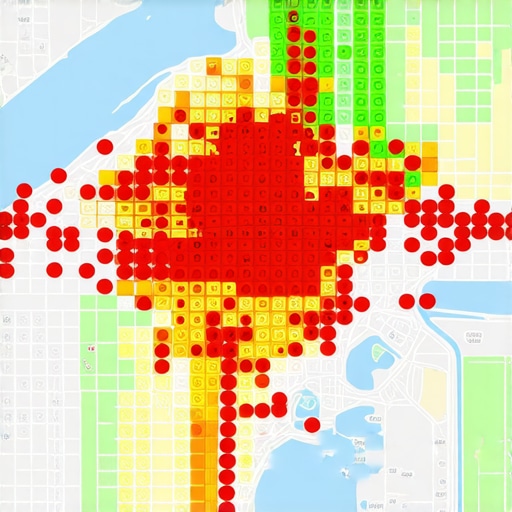
The automated citation trap that kills your authority
One of the biggest ‘oops’ factors I see with advanced users is over-reliance on automated citation syncing. It sounds efficient to have a tool blast your data to a hundred directories, but this often leads to ‘ghost’ duplicates that Google’s algorithm finds suspicious. I’ve caught countless instances where an automated tool overwrote a manually optimized listing with generic data, stripping away the very nuances we worked so hard to build. Instead of volume, you should stop chasing citation volume and focus on this accuracy metric instead.
Don’t let your review management tools put you on autopilot
Another hidden nuance is how we handle feedback. Many review management tools offer templates that make responding easy, but using the same three ‘Thank you for your business’ phrases is a massive missed opportunity. Google reads these responses. If you aren’t naturally weaving in service-level keywords, you are leaving money on the table. This is the only review move that improves your map rank without backlinks. It’s about being human, not just being efficient. You need to understand the key difference between tracking rankings and tracking leads. Have you ever fallen into this trap of trusting your dashboard more than your actual phone lines? Let me know in the comments.Scaling your local presence does not mean you have to be chained to your desk for sixty hours a week. I remember being terrified that if I stepped away from my laptop for even a single weekend, my rankings would just evaporate into thin air. That’s when I finally stopped treating my strategy as a series of manual tasks and started using local seo software to automate the grunt work. I specifically look for a rank tracking feature that actually predicts revenue growth, rather than just giving me a pretty number. Why? Because a ‘top 3’ ranking for a term that has zero commercial intent is just a vanity metric. If you are not seeing a direct correlation between your dashboard and your bank account, you are likely suffering from why your current rank tracker reports miss the hyper-local grid changes. You need to see the grid, not just the list.
How do I keep my map rankings from slipping over the long haul?
Maintenance is the part everyone ignores until their phone stops ringing. I personally rely on a citation monitor to act as my digital watchman. It’s not about how many citations you have, but how accurate they remain after months of Google ‘updating’ things on your behalf. If you aren’t careful, those automated suggestions from the public can slowly erode your authority. I also recommend setting up specific alerts so you can learn how to monitor ranking flux without checking your phone every hour. It’s better for your business and significantly better for your sanity. 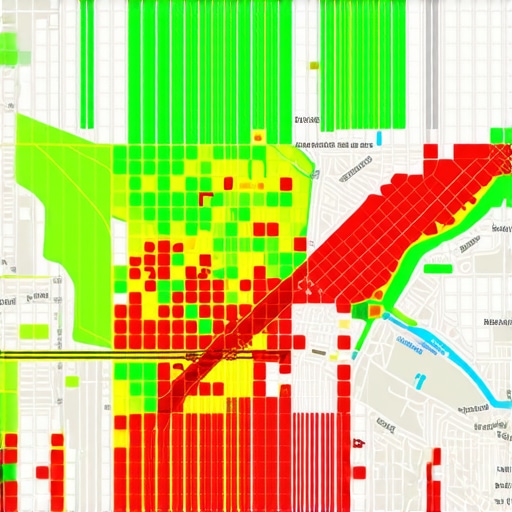 Looking ahead, I suspect we are moving toward a ‘behavior-first’ algorithm. Google is getting much better at detecting whether a click actually resulted in a satisfied customer. This means your review management tools are no longer just for damage control; they are for data enrichment. As Darren Shaw from Whitespark noted in his 2024 Local Search Ranking Factors analysis, the combination of high-frequency review velocity and ‘Reviewer Trust’ is becoming the ultimate tie-breaker in competitive markets. If you want to get ahead right now, stop just asking for five stars and start encouraging customers to mention the specific service they received. This is the advanced move: try creating a QR code that takes customers directly to the review page with a pre-filled prompt asking about their ‘specific neighborhood service.’ Use your maps analytics to see which neighborhoods are lagging, and target your review requests there first. It’s a surgical approach that beats the ‘spray and pray’ method every time.
The Brutal Truth About Digital Breadcrumbs
One thing I wish someone had told me on day one is that Google isn’t looking for a photographer; it is looking for a witness. When you try to make your profile look like a corporate brochure, you lose the local pulse. I have learned that a slightly grainy photo of a technician working in a driveway, geotagged and correctly labeled, does more for your trust than a five-hundred-dollar studio shot. Also, do not let your citation monitor just be a passive alert system. Use it to actively hunt for data drift—those tiny changes in your phone number format or address abbreviations that confuse the AI. You should also understand why most local seo software tools overestimate your true ranking so you can stay grounded in what your customers are actually seeing on the ground.
How I Stay Ahead of the Pack
I do not just guess where a business stands in the market. I rely on a specific stack that includes the rank tracking feature that actually predicts revenue growth. Beyond standard local seo software, I highly recommend keeping an eye on Whitespark’s annual research on local ranking factors; it is the gold standard for staying grounded in reality. I also personally implement the review management strategy that triples positive feedback to ensure my clients are not just getting stars, but are receiving high-quality, keyword-rich descriptions from their own customers. Lastly, I keep a close eye on the citation monitor setting that catches profile hijacks in minutes to protect the hard-won authority we build.
#IMAGE_PLACEHOLDER_E#
Stop Being a Ghost in Your Own City
You have the tools, and more importantly, you now have the context to use them correctly. Whether you are adjusting your maps analytics to find profitable neighborhoods or auditing your image files to stop data bleed, the key is to stay consistent. Your local authority is a mountain you build one bucket of dirt at a time. Don’t be afraid to let your business show its real, unpolished side if it means proving your physical presence to the algorithm. It is time to take control of your rank tracker and turn those digital signals into real-world foot traffic. Have you ever noticed your ranking drop the moment you step just a few blocks away from your office? Let me know in the comments below!